
Getting Started Guide
Learn how to build stacked cluster chart in Power B I
Get StartedVisualize, compare, and analyze: Unleash the power of stacked and clustered data in one chart.
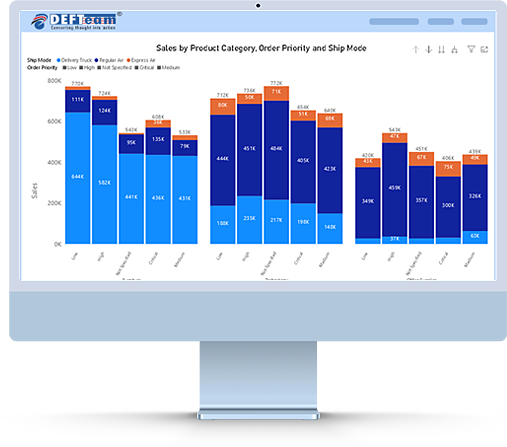
The Stacked Clustered Chart for Power B I is a powerful custom visual that combines the benefits of both stacked and clustered chart types into a single, intuitive visualization. It is perfect for showing how different categories contribute to a total value across multiple clusters. This chart is ideal for business analysts and decision-makers who need to visualize multiple series of data in a way that is easy to interpret and compare.











Learn how to build stacked cluster chart in Power B I
Get Started
Click below to see the working demo
Online DemoThe Stacked Clustered Chart provide business users with a powerful and flexible way to visualize and analyze complex data sets. By leveraging stacked clustered visual, business teams can make more informed decisions, identify trends and patterns, and drive greater success in their respective fields.

The Stacked Clustered Chart combines the clarity of clustered columns with the detailed view of stacked bars, making it perfect for showing proportions and comparisons side by side.
Allows users to define multiple dimensions (or categories) for both the clustering and stacking axis, enabling deeper insights.
Quickly compare values across different categories or time periods while also visualizing the composition of each cluster.
Use the stacked feature to highlight how parts of a whole contribute, while the clustered feature ensures that overall comparisons are clear.
The chart is space-efficient, enabling you to visualize multiple data series without overwhelming your report with too many visuals.
Users can click on any cluster or stacked section to drill down for more detailed analysis, enhancing the interactivity of your reports.
Compare sales by product categories across different regions or time periods. Use the stacked feature to see how individual products contribute to the total sales in each region or period.
Visualize expenses by department (clusters) and the type of expenses (stacked segments) within each department for more insightful budget tracking.
Track market share by product or service across multiple markets or competitors, showing both the total size of each market and the contribution of each product or competitor.
Display sales or revenue data year-over-year, with each stacked segment representing a different product or service to see how the composition changes over time.
The Stacked Clustered Chart is a powerful tool for anyone looking to make data comparisons clearer and easier to understand. Whether you're tracking sales performance, financials, or market trends, this custom visual will add significant value to your Power B I reports.


